Location Services
What is Location Services in Ulaa?
Location Services in Ulaa allows websites to determine your device’s geographical location when permitted.
Why was Location Services previously disabled in Ulaa?
At Ulaa, user privacy is our top priority. In the past, we disabled Chromium’s location services to prevent sensitive data such as nearby Wi-Fi, Bluetooth, and cellular information from being transmitted to third-party providers like Google. This helped protect user privacy and prevent potential data leaks.
How does Location Services work in Ulaa?
Starting from Ulaa version 2.28.2 and above for Mac and Windows, we have reintroduced Location Services using the native system location provider. This means Ulaa will now rely only on the native system location provider instead of third-party services. To use Location Services in Ulaa, you need to enable it in your system settings first.
How to Enable Location Services in System Settings on Mac:
Go to System Settings > Privacy & Security > Enable Location Services > Enable Ulaa.
How to Enable Location Services in System Settings on Windows :
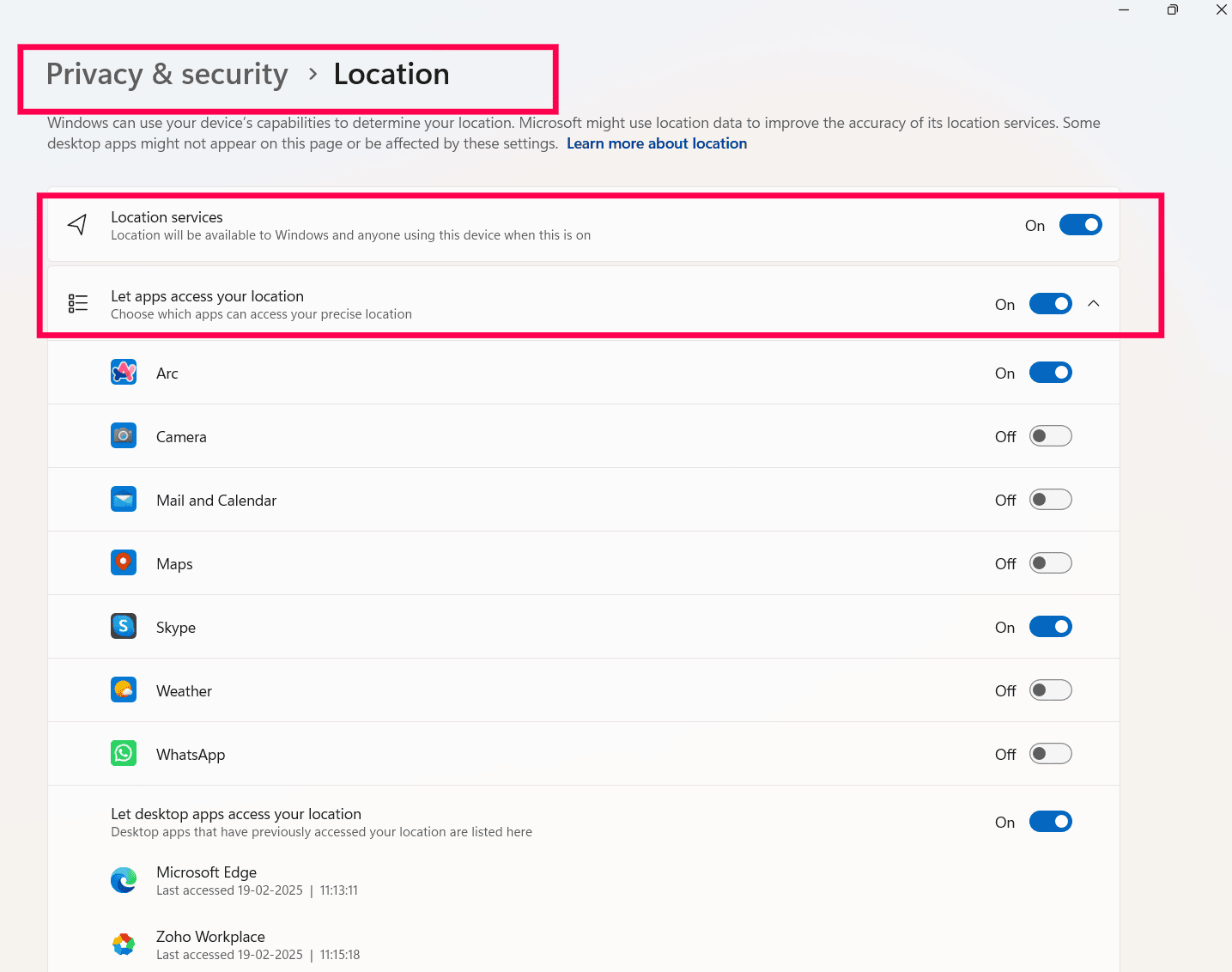
Click the Start button > Go to Settings > Privacy & Security > Location > Enable "Location Services" and "Let apps access your location".
Why isn't Location Services available on Linux in Ulaa?
Linux does not have a standardized, built-in location service like Windows and macOS. Unlike these operating systems, which provide native location services that applications can access, Linux distributions typically rely on third-party solutions or manual configurations. Since Ulaa now depends on the native system location provider, this feature is currently unavailable on Linux.

Note : Location Services has been introduced for Windows and Mac in Ulaa v2.28.2. Please update Ulaa to the latest version to access this feature.
Additionally, we are exploring suitable alternatives for Linux, but there is no estimated timeline yet.

For any additional queries or assistance reach us at https://ulaabrowser.zohodesk.com/portal/en/newticket
Want to share your feedback? Write to us at https://ulaa.com/feedback